Sunday, August 9, 2009

What Do You Need To Know To Create A Website?

If you want to create your own websites, there are several
skills you need to get the job done. Some need a steep
learning curve, meaning that they are easy to learn, while
others need more effort in order to be executed properly.

We’ve listed down some of the skills needed in creating
websites.

1. Using a graphics editor

- this is important when you wish to create graphics for
your website. A good graphics editor can do jobs such as
simple photo editing to more complex ones such as creating
gradient and reflection effects. Photoshop and GIMP are
popular graphics editors used by designers.

2. HTML

- is another important skill any web designer needs to
have. HTML is a markup language, and just like other markup
languages, it tells the computer how the graphics and other
elements of the page will be displayed. Basic tags are
enough to let normal users get by, but knowledge of more
specialized tags are needed by those who want to build
better websites.

(click to see video)


3. CSS

- is short for Cascading Style Sheets. Having a style sheet
for a website makes it easier for designers to design a
page by assigning values to tags such as those used in
paragraphs, lists and the likes. With a style sheet, a
style can be easily applied by using a variable on any part
of the site.

4. Flash

- is a program used for creating animations, games and
entire websites. Knowledge on how to use this is a must
among web designers. While the basic commands will be
enough for most users, Flash’s ActionScript gives people
more control over their creations.

Please leave your comments. We love reading them.

Dan and Deanna "Marketing Unscrambled"

Friday, August 7, 2009

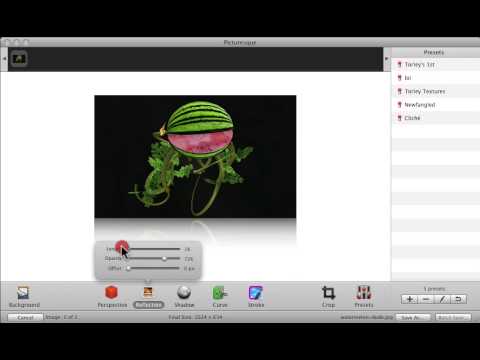
How to make web2.0 reflections for 3D images for your websites?

Reflection is another design element that is used heavily
in Web 2.0 websites. This technique is often employed in
icons to create a 3D effect on the image.

The use of this design turns images that are otherwise
plain into visually-pleasing ones.

Want to make a 3D icon? Follow these steps:

1. Open your favorite graphics editing program.

2. Open or paste your image on the working area.

3. Create a copy of that image and place it directly where
you want to place the reflection. Remember that a
reflection is a mirror-image of the image. This is
important when making any reflections on your design.


4. Create a layer mask over a good portion of the
reflection.

5. Place a gradient effect on the remaining portion of the
reflection to create the illusion of a reflection.

6. Voila! You have now created a 3D icon.

Of course, there are several ways of creating this effect.
The one that we have shown you is only one of them. You can
find a lot more tutorials on the internet that will help
you achieve this effect. Choose one that you find most
effective.

However, keep in mind to use this effect sparingly. Just as
in any kind of visual effect, overdoing your reflections
can make your overall design look tacky and unprofessional.

You don’t want your design to look amateurish, right?
Subtlety is the key to creating great designs and you
should incorporate this in the designs that you make,
including creating reflections.

We love comments, please leave one.

( Hilary, we hope that this helped on this subject.)

Dan and Deanna "Marketing Unscrambled"

Thursday, August 6, 2009

How Has The Internet Changed With Web 2.0 Designs And Graphics?

Web 2.0 has created a revolution on the internet in a
number of ways. There’s the collaboration factor which
enabled people to share information much easier than
before.

Then there’s the factor of bringing the desktop environment
to the internet. But nothing’s more obvious in the Web 2.0
world than the so-called Web 2.0 design.

What makes a Web 2.0 design different from the designs of
the past? Here are some of the elements that set it apart
from everything that has come before it.

1. Rounded boxes

- although this has been used in designs of the past, this
design element wasn’t used extensively until Web 2.0 came.
This helps give a fresh look into websites which used to be
dominated by very professional-looking rectangular boxes.


2. Reflections

- this element aims to give off a 3D look for icons.
However, this is to be used sparingly, only to be used to
give depth to otherwise plain-looking icons.

3. Whitespace

- in web designs of old, having a lot of whitespace was a
no-no. Information was to be packed in as much space as
possible. But not anymore in the Web 2.0 world. Having a
lot of whitespace on a design makes it possible to read
things on-screen without causing too much eye strain. Aside
from that, it sets borders among elements without actually
creating a demarcating line.

4. Large fonts

- immediately capture one’s attention. Large fonts are
therefore useful in highlighting important parts of the
webpage especially the headlines and the banners.

Please leave your comments. We love to read them.

Dan and Deanna "Marketing Unscrambled"
Wednesday, August 5, 2009

What Is Web 2.0 And How Can It Help You?

Anyone who wants to understand Web 2.0 design must first be
familiar with what Web 2.0 means. The phrase stands for the
supposed second generation of the web that focuses on
collaboration and sharing of information among users.

What used to be one-way highways of the old web is now
replaced by a community-driven world of Web 2.0.

The term Web 2.0 was first used in 2004 during the O’Reilly
Media Web 2.0 conference. This suggested a change on how
developers and users use the web.

Some of the things related to Web 2.0 include blogs, RSS
(really simple syndication) feeds, social bookmarking
websites and the like.

All of them share the common factors of having
interactivity and communication between the website owner
and the visitors, as well as among the visitors themselves.


The so-called Web 2.0 encompasses the back and front end of
websites. However, to the average users, the changes are
most evident on what they actually see and use on the
websites that they visit.

For example, for Ajax-based applications, what they see are
the updating of data on the page without actually
refreshing the entire page, which was the technique before.

Web 2.0 has made it possible to create a desktop
environment to websites. For example, users of the past can
only type their documents on their computers and were only
able to share them to others by sending it through e-mail.

But with Web 2.0, users can now create their documents on
websites which offer that service and are able to share
them to others by merely adding the e-mail addresses of
their friends. Such is the case with Google Documents,
formerly known as Writely, until Google acquired the
company.

All in all, Web 2.0 has further enriched the internet by
letting people collaborate, making the web into a true
community.

Thank you for reading. Please leave your comments, we love to read them.

Dan and Deanna "Marketing Unscrambled"

Tuesday, August 4, 2009

Appointments Help You Get More Done With People That Are Inerested In What You Have!

One of the best strategies that you can have when you are
trying to get leads is to use set appointments to meet with
the prospective customer.

When you make an appointment with someone who may become a
future customer, there are several benefits that you will
find.

1. You are speaking with a person who makes decisions

When you set an appointment, you are cutting through the
middle man. This saves a lot of time and you won't have to
worry about having to come back to talk to the right
person.

2. There's a time to meet

When you have an appointment to meet with a lead, you can
prepare and you know exactly what you are going to say. The
other thing is that you know exactly how much time that you
have for your presentation, so you can make sure that you
utilize it to the best of your ability.


3. It cuts down on time that is unproductive

Just the fact that you have an appointment with someone
means that they are mildly interested in what you have to
say. You know you're not going into the meeting blindly and
wondering whether or not you will be wasting your time.

4. You know something about your audience beforehand

Appointments give you ample time to do research on your
prospective clients and understand what their needs are so
that they can be addressed during your meeting. This offers
an advantage because you will go into it being able to
offer something that they need.

It's always a good idea to be prepared and to know your
audience. Making an appointment with your prospective
client helps you to do both.

Please leave your comments, we love to read them.

Dan and Deanna "Marketing Unscrambled"

Saturday, August 1, 2009

How To Use This Useful Marketing Tool, Surveys?

One of the best ways that you can generate leads is to have
people fill out surveys. This gives you a good idea of what
they are looking for, what their age group is, and so on.
But there are a few things that should be considered when
you are composing surveys.

1. Keep it short

You don't want to ask too much information of the clients
because it may scare them off instead of making them
interested in your company or product.

2. Respect their privacy

Assure them that the information that you collect is going
to be for your eyes only, and that it won't be sold to
another company. This is something that is important to
people and when you make this promise, it shows that you
respect them and their wishes.

3. Offer them a thank you

Let them know that you appreciate the time that they took
to do the survey and offer them a thank you present. It
doesn't have to be elaborate or expensive, but people like
to know that they are appreciated.

(click to see videos)


When a survey is done right, and in the right manner, it
can be a very useful marketing tool. The thing to remember
is that in order to make them work, people have to be
willing to fill them out.

Respect their time, respect their privacy, and respect
their effort, and you will find that people will give you
answers that will be useful and helpful to you and your
company.


We thank you for adding to the subject of survey's.
Please leave a comment.

Dan and Deanna "Marketing Unscramble"